
GE Signa Excite HD 1.5T MRI operator manual procedures
12x GE MRI Operator Manual Procedures
Signa Excite Applications
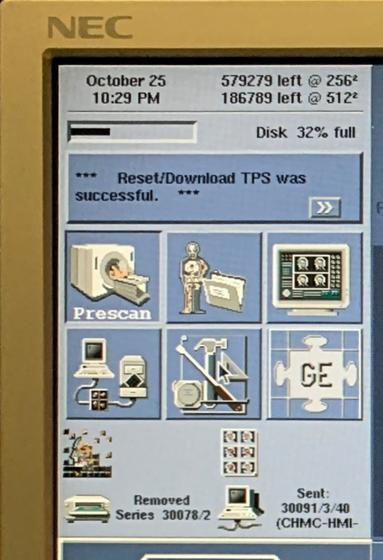
- Disk capacity for 256 and 512 imaging matrices. Bar below reflects overall image limit as a percentage.
2. Reflects current error. Click anywhere inside the box to populate error log.
3. Desktops (left to right, top row) Scan: perform all patient MRI scans from this desktop Icon, Protocol: Edit, add and delete MRI protocols. Display: View image archive browser to access all saved image data. (left to right, bottom row) Archive and Network: Network and archive image data, Service: Calibration Protocols, configuration files and other critical system functions, and
InSite: Contact GE support virtual assistant (subscription may be necessary)
4. (Left to right) Reflects reconstruction, filming, archiving, and networking status.
GE Signa Excite HD 1.5T MRI Operator Manual Procedures
- Power On Procedure
- Shutdown Procedure
- How to check MRI liquid helium levels
- MRI TPS Reset Procedure
- Article: GE MRI TPS Reset
- Video: How to Reset TPS (GE MRI)
Startup MRI System
The following steps describe how to power system on and login to GE Signa Excite applications.
Quality Assurance (QA) Procedures
Before scanning patients, perform a QA scan to make sure the system is functioning correctly. Perform Daily QA procedure and the Head Coil QA procedure to ensure optimum image quality. Both procedures make use of the QA phantom. Run both QA procedures after positioning the phantom. Create a protocol procedure for faster workflow.
GE Signa Excite MRI Daily QA Protocol
| Patient Position | Patient Entry: Head First Patient Position: Supine Landmark: Other Coil: Head |
| Image Parameters | Plane: Axial Mode: 2D PSD: SE |
| Scan Time | TE: 20 TR: 200 |
| Scan Range | FOV: 24 Slice Thickness: 10 Spacing: 10 Start: 50 End: 50 |
| Acq. Time | Phase: 256 Frequency: 256 NEX: 1 Center Frequency: Peak |
GE Signa Excite MRI Daily QA Procedure
- Click [New Patient].
- Enter the following: Patient ID = Profile, Weight = 100, and any other tracking data required by your site.
- Position the QA in the head coil base. Ensure phantom is level and is seated in all the way.
- Slide the head coil over the phantom. The axial black line on the phantom should line up with the top as you slide the head coil cover over it.
- Press Laser Alignment Light.
- Press In Slow to center the alignment light over the axial line on the phantom.
- Press the Landmark Button.
- Press Move To Scan to move the coil and phantom to magnet isocenter.
- Return to the operator workspace and enter the protocol listed below.
- Click [Save Series].
- Click [Auto Prescan]. Once scan is completed, record R1, R2, and TG and center frequency (AX) values. This can useful tracking information for troubleshooting image quality issues.
- Click [Scan].
- Perform another scan in the coronal and sagittal plane. (Record values, similar to step 11).
Scroll through the daily QA images and verify images are free of artifact. Contact your service engineer if you notice a degradation of image quality.
Head Coil QA Procedure
After completing the Daily QA procedure, continue with the Head Coil QA procedure.
Head Coil QA Protocol
| Patient Position | Patient Entry: Head first Patient Position: Supine Landmark: Other Coil: Head Series Description: Head coil QA |
| Image Parameters | Plane: Axial Mode: 2D PSD: SE |
| Scan Time | TE: 25 TR: 300 |
| Scan Range | FOV: 24 Slice Thickness: 3 Spacing: 1.5 Start: 0 End: 0 |
| Acq. Time | Phase: 256 Frequency: 256 NEX: 2 Center Frequency: Peak |
Scroll through the daily QA images and verify images are free of artifact. Contact your service engineer if you notice a degradation of image quality.
Related resources
Quick Navigation Links
Recommended Articles

Author:
Author Bio:
Read more on Larry’s author page.
The information provided by MRIPETCTSOURCE (“we,” “us,” or “our”) on https://www.medicalimagingsource.com (the “Site”) is for general informational purposes only. All information on the Site is provided in good faith, however we make no representation or warranty of any kind, express or implied, regarding the accuracy, adequacy, validity, reliability, availability, or completeness of any information on the Site. UNDER NO CIRCUMSTANCE SHALL WE HAVE ANY LIABILITY TO YOU FOR ANY LOSS OR DAMAGE OF ANY KIND INCURRED AS A RESULT OF THE USE OF THE SITE OR RELIANCE ON ANY INFORMATION PROVIDED ON THE SITE. YOUR USE OF THE SITE AND YOUR RELIANCE ON ANY INFORMATION ON THE SITE IS SOLELY AT YOUR OWN RISK.
Amazon and the Amazon logo are trademarks of Amazon.com, Inc. or its affiliates.
Disclaimer: This website is not affiliated with, endorsed by, or sponsored by GE Healthcare. GE, GE Healthcare, and all product names and logos — including those related to MRI, CT, and PET systems — are registered trademarks of General Electric Company. All product references are for informational and educational purposes only.